Free EMDR worksheets and scripts, explained phase by phase
Free EMDR worksheets and scripts for licensed EMDR therapists, organized by phase: history taking and target planning, preparation, Phase 3 assessment, cognitions, SUD and VoC scales, and progress notes. Choose the resource for your next clinical task below. The library includes printable and fillable PDFs, a PCL-5 form and a processing guide.
Free, no account needed. Thirteen resources, from Phase 1 to your session note.
Worksheets are a format, not the protocol
Most EMDR worksheets in circulation are clinician shortcuts for recording the same fields: target image, negative and positive cognitions, VoC, SUD, body location, and a set-by-set tally during desensitization. That is useful. The worksheets below cover Phases 1 to 3, and the guides cover what happens after.
What a worksheet cannot give you is the protocol itself: what to say when the client loops or goes blank. That is the part this page builds toward.
Printable EMDR worksheets (PDF)
Choose by phase and task: history taking and Floatback for target planning; Safe Place, RDI, grounding and Light Stream for preparation; the Phase 3 worksheet, cognitions and scales for assessment; and templates for session notes. PDF resources are marked below. The PCL-5 is an online form, and the stuck-processing resource is a guide.
Phase 1
History taking and target planning
-
PDF
History taking worksheet
For therapists conducting intake and target planning. Record presenting concerns, history and triggers, check readiness, and build a three-pronged target plan on three printable pages.
-
Online form
PCL-5 calculator
For clients completing the 20-item PTSD Checklist for DSM-5 and therapists reviewing their responses. The online form calculates the total score.
-
Fillable PDF
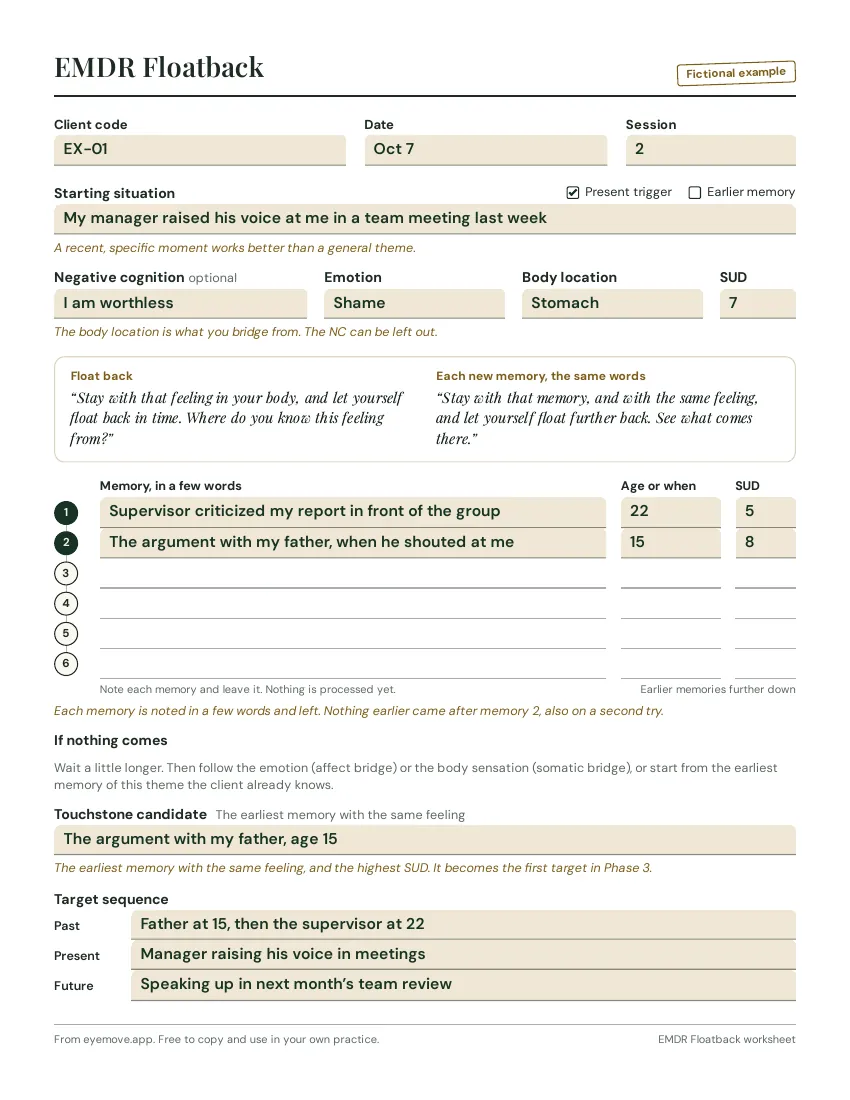
Floatback script
For therapists identifying a touchstone memory behind a present trigger. Follow the Floatback script and record the related memory in the fillable worksheet.
Phase 2
Preparation and stabilization
-
Fillable PDF
Safe place script
For therapist-led preparation with a client. Follow eight steps to develop a safe or calm place, choose a cue word and test it, using a fillable worksheet.
-
Fillable PDF
RDI script
For therapist-led resource development and installation. Identify a quality the client needs and strengthen it with a memory of mastery, a symbol and short sets.
-
PDF
Grounding and stabilization scripts
For therapists guiding preparation and stabilization. Read aloud the Safe or Calm Place, Container, 5-4-3-2-1 grounding and Butterfly Hug scripts.
-
Fillable PDF
Light Stream script
For therapists helping a client settle body tension during preparation or closure. Follow the seven-step Light Stream script and use the fillable worksheet.
-
PDF
Client handout
For clients learning about EMDR before starting therapy. Share or print this plain-language explanation as a companion to the preparation conversation.
Phase 3
Assessment
-
PDF
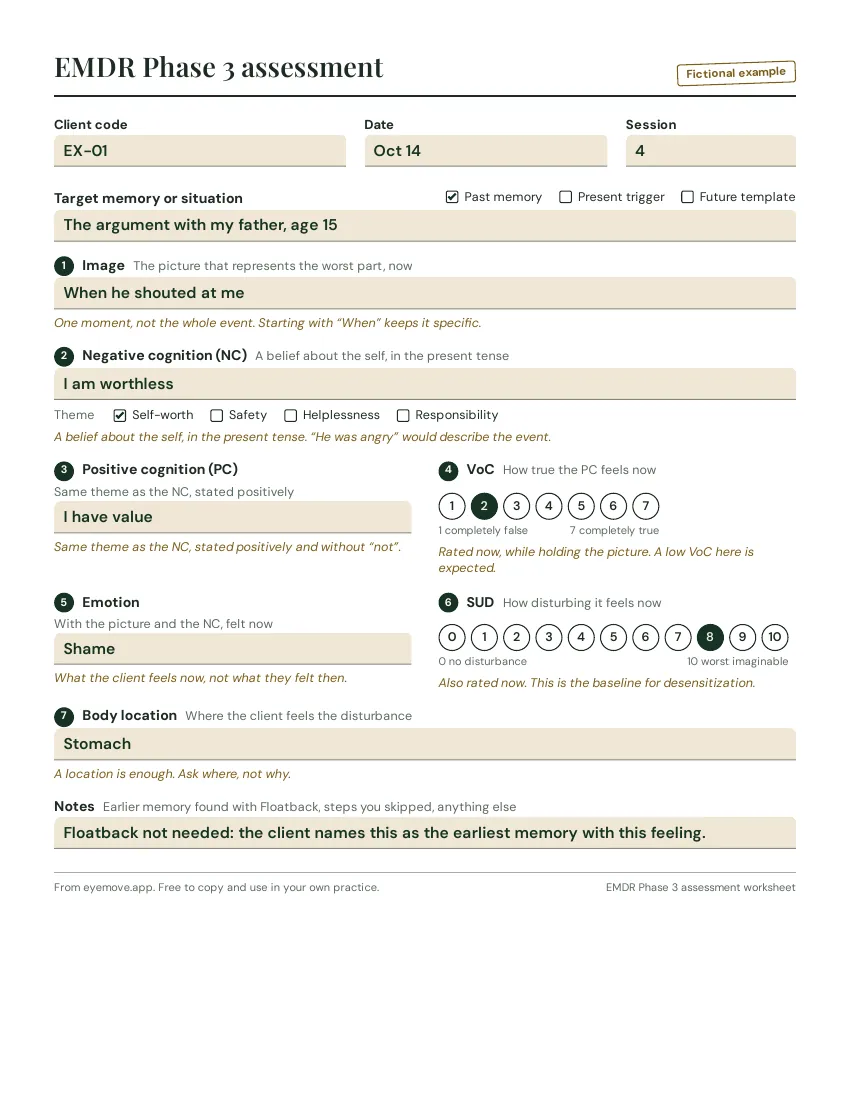
Phase 3 assessment worksheet
For therapists assessing each target in Phase 3. Record the image, NC, PC, VoC, emotion, SUD and body location on one page, with a completed example for reference.
-
PDF
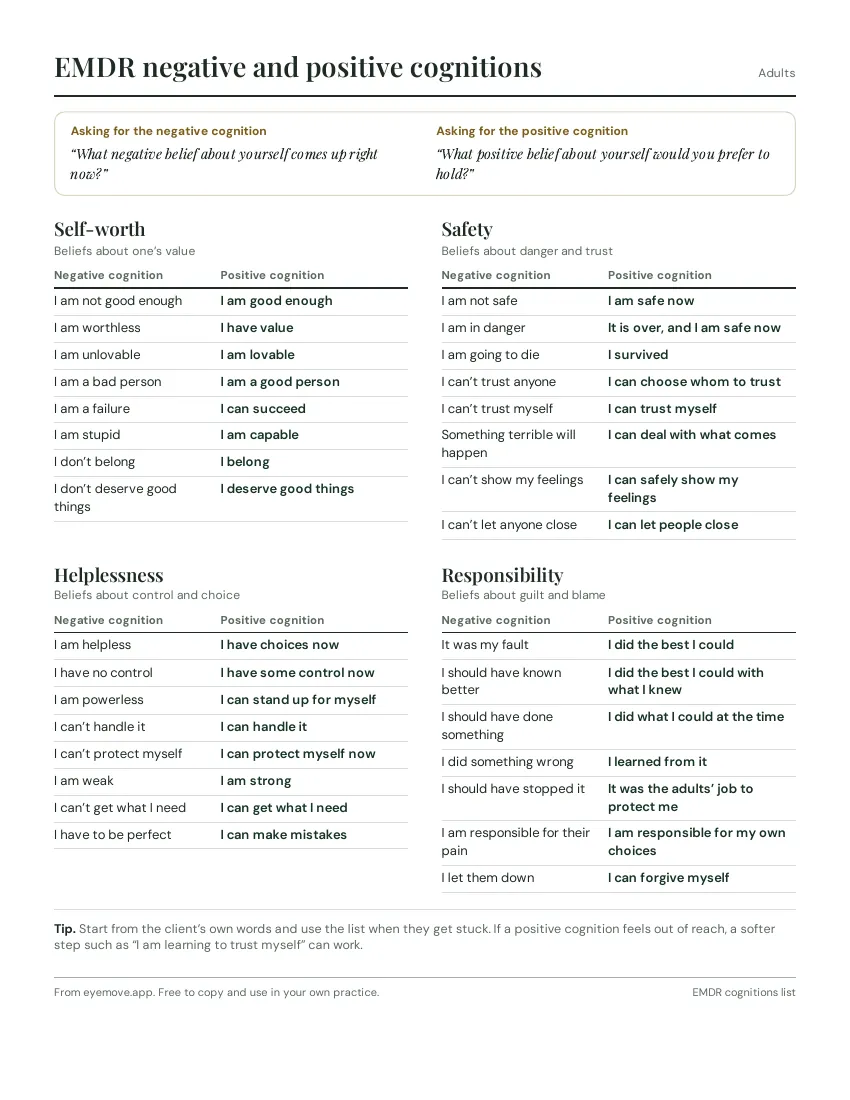
Cognitions list
For therapists exploring negative and positive cognitions with a client. Find paired examples under four themes, with wording for adults, teens and children.
-
PDF
SUD and VoC scales
For therapists taking SUD and VoC ratings with adults, teens or children. Print the numbered scales or the child versions with faces and steps.
Phases 4 to 8
Processing, closure and notes
-
Guide
When processing gets stuck
For therapists when processing loops, goes blank or stops changing. Use the guide to check capacity first, identify the block and choose an interweave.
-
Template
Progress note templates
For therapists documenting an EMDR session in their own EHR. Choose a SOAP, DAP or BIRP template and refer to four filled-in notes and a copyable phrase bank.
These PDFs are a paper companion. They do not mirror the EyeMove app one to one.
What the worksheets capture, phase by phase
Phase 1: history taking
Phase 1 is conversational, so the worksheet is a checklist that makes sure nothing is missed across one or several intake sessions:
- Presenting concerns and treatment goals in the client’s own words
- Trauma history timeline: events, age at the time, current impact
- Resources, strengths, and existing coping that have helped so far
- Risk and stability screen: dissociation, suicidality, substance use, current safety
- Readiness for reprocessing and the informed-consent conversation
The free EMDR history taking worksheet covers all of this on three printable pages. To find the earliest memory behind a present trigger, use the Floatback script.
Phase 2: preparation
A short consent and resourcing checklist. The point is to confirm the client knows how the session runs, has at least one stabilising resource to return to, and is ready to begin:
- Psychoeducation about how EMDR works and what a session looks like
- Stop signal and pacing agreement so the client can pause at any moment
- Resourcing exercises: Safe / Calm Place, Container, and grounding anchors
- Plan for the first target, including the negative cognition to test
The safe place script installs a calm place step by step, the RDI script strengthens a quality the client needs, the grounding scripts above are ready to read aloud, and the Light Stream script helps when tension sits in the body.
Phase 3: assessment
This is where worksheets stop being checklists and start being data. Every value below changes during a session, and ideally is captured at the moment it changes, not reconstructed from memory afterwards:
- Image: the single moment that represents the worst part
- Negative cognition (NC): the belief the client holds about themselves now
- Positive cognition (PC): what they would like to believe instead
- Validity of Cognition (VoC): 1 to 7, how true the PC feels right now
- Emotions present when holding the image and the NC
- Subjective Units of Disturbance (SUD): 0 to 10
- Body location where the disturbance is felt
The free EMDR Phase 3 assessment worksheet has all seven parts on one page, with a completed example. For the cognitions, see negative and positive cognitions by theme, and for the ratings, the SUD and VoC scales.
Phases 4 to 8: processing, closure and reevaluation
From here, the record is mostly what happened during the session:
- Desensitization: type of BLS, number of sets, the SUD trajectory and any interweaves
- Installation: the positive cognition and the VoC at the end
- Body scan: anything left in the body, and whether it cleared
- Closure: how the session ended, complete or incomplete, and the client’s state
- Reevaluation: where the target stands at the start of the next session
The progress note template has four filled-in examples, and the guide to stuck processing covers what to do when the SUD stops moving.
When processing stalls
A printed worksheet records what already happened. The hardest part of an EMDR session is not the recording. It is the decision in the next ten seconds when the client loops, blanks, or hits a blocking belief, while you are also tracking the clock, the client, and the next set.
EyeMove is built around that moment. Stuck support opens when EyeMove notices several sets without change, or when you open it yourself, and the BLS keeps running the whole time. It walks you from the client’s capacity to what may be blocking and a fitting interweave, and your choice waits on your screen until you stop the set.
That is the part a paper worksheet cannot do.
Read the guide: When EMDR processing gets stuckThe rest of the flow
- Phase-aware prompts for Phases 3 to 7, updated set by set
- SUD and VoC through the session, with a SUD graph at closure
- Installation, body scan and closure prompts built into the flow
- NC and PC examples built into the Phase 3 assessment
- BLS from your phone, tablet or laptop, in the room or online
- Session notes encrypted in your browser. We hold no keys.
30 days free. Payment card required. Cancel anytime.
Common questions

Reviewed by Bjarne ØverlandClinical psychologist, specialist in psychotherapy, and founder of EyeMoveLast updated October 2026
Which EMDR worksheet should I start with?
The history taking worksheet for Phase 1, then the Floatback worksheet to find targets, and the Phase 3 assessment worksheet for each target you process.
Do I need printed EMDR worksheets to run a session?
No. They help you structure Phases 1 to 3 and keep a record, but many therapists use them for intake and planning and run the session itself from a tool. Use what fits your practice.
Are the worksheets free to use with my clients?
Yes. You can download, print and copy them for your own practice. No account is needed, and some of the PDFs can be filled in on screen.
What does EyeMove replace?
The paper worksheet during the session, a separate BLS tool, and the note you write afterwards. Your records stay in your own EHR.
What happens when processing stalls in EyeMove?
Stuck support opens when EyeMove notices several sets without change, or when you open it yourself, and the set keeps running. It walks you from the client’s capacity to what may be blocking and a fitting interweave, and afterwards you mark how the client responded.
Does EyeMove include a list of negative and positive cognitions?
Yes. In Phase 3 you pick the theme of the negative cognition and see typical examples, and the questions are reworded in Youth and Child mode. The full list is also free on this page as a PDF.
Is there a script for Phase 1 or Phase 2 in EyeMove?
For Phase 2, yes: Safe Place, Resource Installation, Light Stream, Float Back, grounding and psychoeducation, with visuals on the client’s screen. Phase 1 is a conversation, so EyeMove gives you the history taking worksheet and the PCL-5 instead of a script.
Can I still use paper worksheets alongside the app?
Yes. The PDFs are a paper companion and do not mirror the app one to one. Many therapists use the history taking worksheet at intake and EyeMove from Phase 3 onward.