An EMDR session tool that keeps the protocol in order, so you can stay with your client
Your client follows the bilateral stimulation on their own screen. You see the protocol, the words to say and the SUD on yours, with a clear path when processing gets stuck.
30 days free. Payment card required. Cancel anytime.
- No client records
- Encrypted in your browser
- Deleted within four hours
- No AI

Built by a psychologist who uses EyeMove in his own EMDR practice every day.
What is an EMDR session tool?
An EMDR session tool is software that supports the therapist during an EMDR session. The simplest ones deliver bilateral stimulation (BLS): a dot, a light or a sound that moves from side to side. A complete EMDR session tool also supports the clinical work around the BLS, such as where you are in the protocol, what to say next, how the client's SUD is changing, and what to do when processing stops moving.
Many EMDR tools focus on the first part. EyeMove was built to do both.
Three kinds of EMDR tools compared
| Kind of tool | What it gives you | What it leaves to you |
|---|---|---|
| Light bars and tappers | Physical bilateral stimulation in the therapy room | Protocol tracking, prompts, session notes and online sessions |
| BLS apps and websites | A moving dot or bilateral sound on a screen | Protocol tracking, stuck support and session notes |
| Session tools like EyeMove | BLS on the client's screen, phase-by-phase guidance, SUD tracking, interweaves and session notes | Your clinical judgment, which always stays with you |
How an EMDR session runs in EyeMove
There is nothing to install, for you or for your client. A session starts in your browser and ends with notes you can copy into your own records.
- 1
Start a session
Open EyeMove on your phone, tablet or laptop and create a new session. You never enter a client’s name or initials.
- 2
Share the client screen
Copy the session link and open it on the client’s screen: a laptop facing the client in the office, or the client’s own device online.
- 3
Follow the guidance
EyeMove shows the next step and the words to say. You choose the movement pattern and speed and start each set, and SUD and sets are logged as you go.
- 4
Close and copy your notes
EyeMove writes structured notes from what you recorded. Copy them into your own EHR. The session is deleted automatically within four hours.
Protocol guidance through all eight EMDR phases
EyeMove follows the standard eight-phase EMDR protocol. Turn guidance on when you want the structure in front of you, and off when you know the ground well. A built-in handbook shows how every tool fits the eight phases.
- Phase 1
History taking
Gather history, identify targets and plan the treatment.
- Phase 2
Preparation
Build stability and explain the process, with grounding exercises and visual psychoeducation, such as the Inner Wall, on the client’s screen.
- Phase 3
Assessment
Activate the target: image, negative and positive cognition, VoC, emotion, SUD and body location.
- Phase 4
Desensitization
Reprocess the target with sets of bilateral stimulation. After each set you log what the client noticed, and EyeMove suggests the next step.
- Phase 5
Installation
Link the positive cognition to the target and strengthen it with BLS.
- Phase 6
Body scan
Check the body for remaining disturbance while the client holds the target and the positive cognition in mind.
- Phase 7
Closure
Return the client to a stable state before the session ends. EyeMove generates your session notes here.
- Phase 8
Reevaluation
At the start of the next session, review the previous work and decide where to continue.
More than bilateral stimulation
From preparation and age-adapted EMDR to assessment and session documentation.
Children and adolescents
Child and Youth modes adapt the wording and the client’s screen. SUD and VoC can be shown as simple visual scales the client points to, with calm figures and scenes instead of a plain dot.
EMDR for kids and teensPreparation and target identification
Guided Safe Place, Light Stream and Resource Installation scripts for stabilization. Float Back helps you trace a current reaction back to earlier memories when identifying targets.
Assessment and documentation
The PCL-5 is scored as the client answers, with cluster totals and the DSM-5 symptom rule. It supports your clinical assessment and is not a diagnosis on its own. Structured session notes are ready to paste into your own records.
Support when processing gets stuck
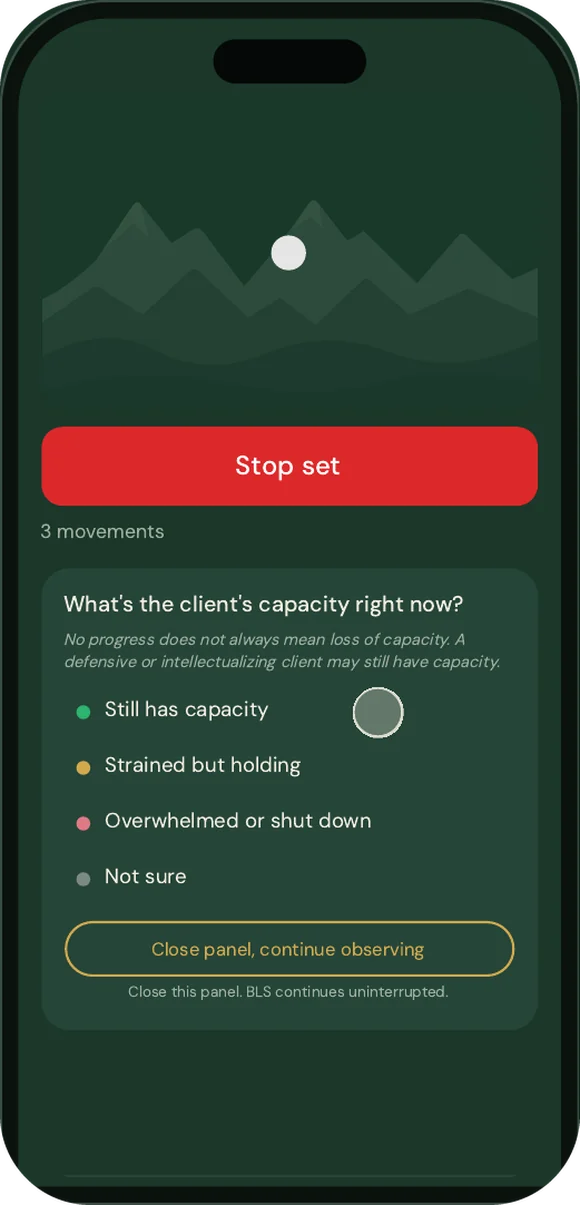
When a set ends and nothing has moved, the next decision matters. Stuck support opens when EyeMove notices several sets without change, or when you open it yourself, and the bilateral stimulation keeps running the whole time.
- 1
Check capacity first
You decide where the client is before anything is suggested.
- 2
Name what may be blocking
Stuck belief or meaning, defensive or controlling, somatic fear, or a target that does not quite fit.
- 3
Choose an interweave
Browse prompts for the block you named. Each comes with a short clinical note on how to use it.
- 4
Queued for when the set ends
Your choice waits on your screen and shows the moment you stop the set.
- 5
Read the response
Moving, activated but connected, or still stuck. When processing moves, EyeMove steps aside.
What EyeMove stores, and what it does not
EyeMove holds no PHI by design. There are no client profiles to protect, because none are ever created.
Client records
None are stored. You never enter names or initials.
Encryption
Session content is encrypted in your browser with AES-256-GCM. EyeMove does not hold the keys.
Deletion
Session data is deleted automatically within four hours.
AI
None. EyeMove is rule-based and deterministic. The same input always gives the same guidance.
Hosting
Servers in the EU, located in Ireland.
Your notes
They go into your own EHR, where your records already are.
Read the privacy policy, the terms of service and the data processing agreement, which includes our HIPAA position statement.
Built by a practicing EMDR therapist
EyeMove was built over a year by a licensed specialist psychologist and clinical psychotherapist in Norway, trained in EMDR through EMDR Europe. He built it to solve two problems from his own sessions: keeping track of the protocol, and knowing what to do when processing stalls. He uses it daily in his clinical work.
Pricing
One plan with every feature included. Start with 30 days free.
Monthly
$19per month
Billed every month.
Yearly
$149per year
$79 less than paying monthly for a year.
A card is required at signup. Or try the free BLS tool first.
Frequently asked questions
What is the difference between an EMDR session tool and a BLS app?
A BLS app gives the client something to follow with their eyes or ears. An EMDR session tool like EyeMove also supports you: it tracks the protocol phase by phase, logs SUD and sets, suggests the next step after each set, offers interweaves when processing gets stuck and writes session notes at closure.
Does EyeMove use AI?
No. EyeMove is rule-based and deterministic. Guidance, decision support and session notes come from fixed rules, so the same input always gives the same result. No session content is sent to an AI model.
Can I use EyeMove for both in-person and online EMDR sessions?
Yes. In the office, the client follows the bilateral stimulation on a laptop or tablet while you run the session from your phone. Online, the client opens the session link on their own device. Read more about EMDR online.
Does my client need an account or an app?
No. The client opens a link in a web browser and sees only the bilateral stimulation and whatever you choose to show them. Nothing needs to be installed.
How does EyeMove handle HIPAA and client privacy?
EyeMove is built so that no PHI is stored: no client names or initials, session content encrypted in your browser, and automatic deletion within four hours. The data processing agreement includes a HIPAA position statement that explains this approach in detail.
Which bilateral stimulation options are included?
Horizontal, saccadic, diagonal in both directions, circular, infinity, pendulum and random eye movements, with adjustable speed. Audio can be switched on separately for you and for the client.
How much does EyeMove cost?
$19 per month or $149 per year, with a 30-day free trial. A card is required at signup.
Is there a free version?
The BLS tool at eyemove.app/bls is free to use. The full session tool, with protocol guidance, stuck support and session notes, comes with a 30-day free trial.
Comparing options? Read our guide to EMDR tools for therapists.
Try EyeMove in your next EMDR session
The trial lasts 30 days and includes every feature.